


In PPO, visibility is everything. Whether you’re reviewing projects, risks, tasks, or requests, the way information is presented directly impacts how quickly you can interpret and act on it.
The List Widget has always given users the flexibility to tailor how data is displayed. Now, we’ve enhanced that capability by introducing Group By functionality directly within the existing List Widget.
What’s New: Group By Within The List Widget
The new Group By option allows you to organise your list data into structured categories directly within the list page.
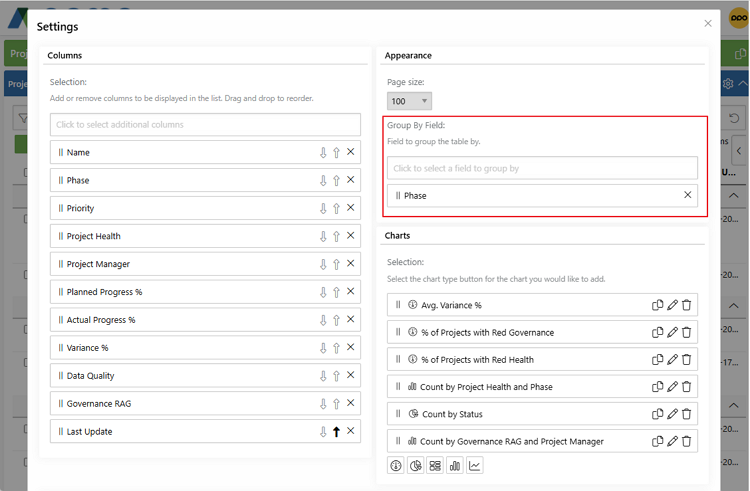
Rather than working through a flat dataset, you can now organise information into logical groupings that provide immediate context and clarity.
For example, you can group:
- Projects by status or stage
- Tasks by responsible person or status
- Risks by status, risk owner or type
- Demand by department or priority
Each grouping can be expanded or collapsed, allowing you to move seamlessly between high-level summaries and detailed records without leaving the page.
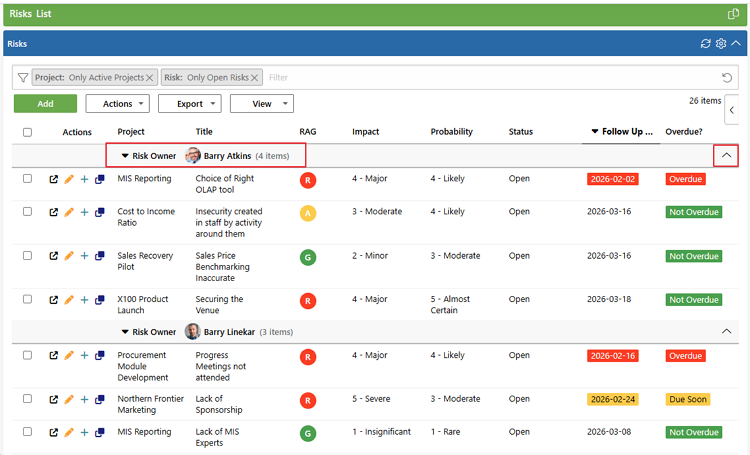
Because this enhancement is built into the existing List Widget, it is available on all entity list pages — ensuring a consistent review experience wherever you are working in PPO.
Why This Matters
As organisations mature in their use of PPO — extending the platform to more teams and increasing the completeness and quality of their project data — the volume of information available for review naturally expands.
Sorting and filtering remain powerful tools to refine datasets. However, historically, structured grouping was only available within reports and dashboards. If you needed grouped insight, you often had to navigate away from your working list.
This means you can:
- Structure data around operational priorities
- Review larger, more complete datasets with greater clarity
- Analyse information directly where you’re working
- Reduce the need to navigate to separate reports or dashboards
What Happens to Existing List Settings?
Nothing changes to your current list configurations.
All existing List Widget settings — including columns, sorting, filters, and row limits — remain exactly as they are. The Group By option is simply an additional control available within the same configuration area.
Users can update their own list settings to introduce grouping where it adds value.
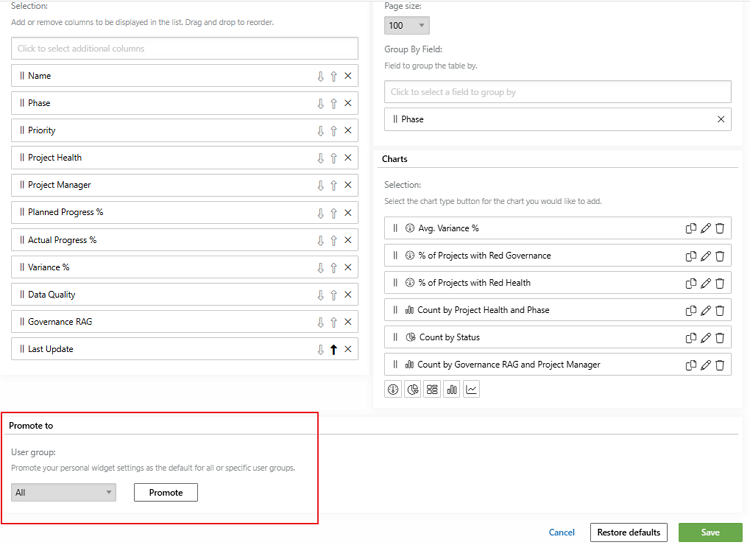
Alternatively, PPO Administrators can configure default Group By settings on entity list pages and promote these as standard views for specific user groups. This provides an opportunity to introduce structured, governance-aligned list views while still allowing flexibility where needed.
We do our very best to make PPO better every day, so we’d love to hear your feedback on these latest enhancements.
Don’t forget to let us know if you have any other product enhancement ideas! Drop us an email or log an idea on our community portal please. More importantly, keep up to date with all our new product information by subscribing to our blog.
